
After a visit or purchase, getting someone to think “I want to come back” or “I’d recommend this” takes both a chance to reflect on the experience and a small thank-you.
With Omakase MEO, you can build store-specific flows with branching surveys, and use rewards to encourage answers and review posts. You can also connect surveys to Instagram follower campaigns you already run — just add the survey URL in a DM.
This article covers three practical points:
Branching questions for flexible surveys that match how customers use your store
Existing Instagram follower campaigns — promote the survey by putting the URL in a DM
Rewards that drive answers, reviews, and return visits
Build flexible surveys with branching questions
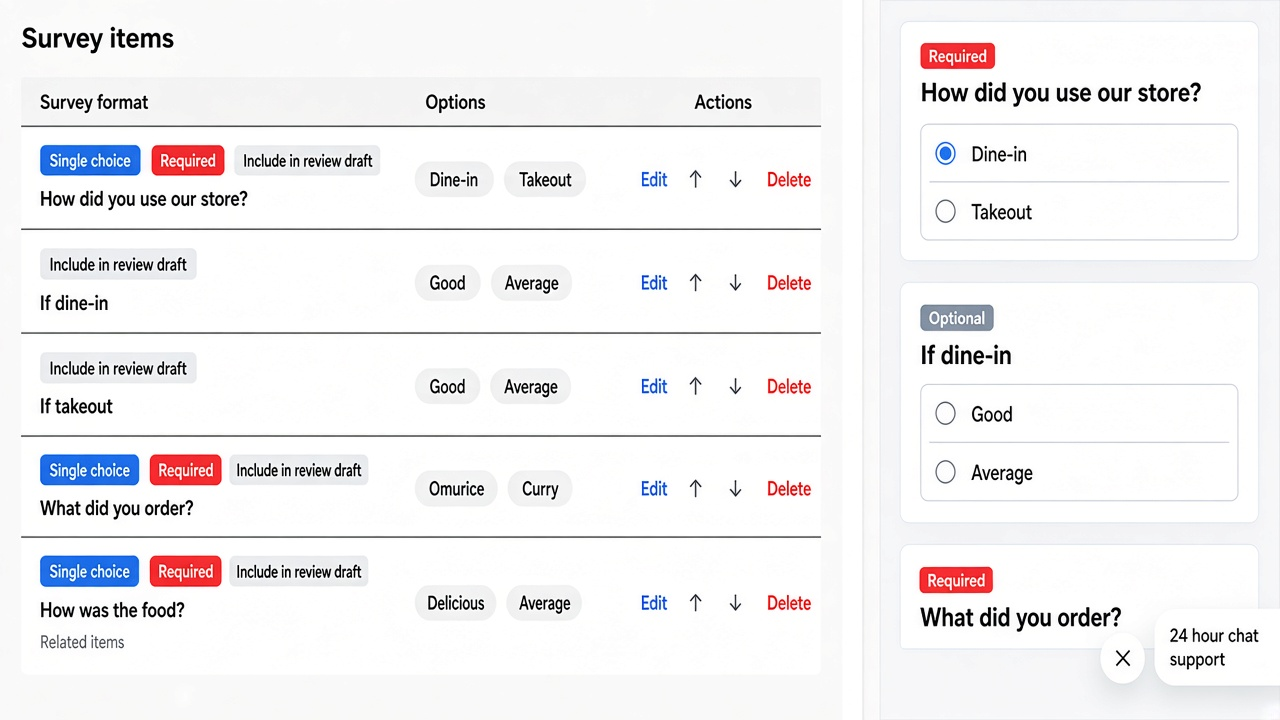
Omakase MEO surveys can show different follow-up questions based on the previous answer.
For example, you can set up a flow like this:
Ask “How did you use our store?” with dine-in / takeout
Show “How was the service?” only to people who chose dine-in
Ask about wait time for pickup only to people who chose takeout
The same survey URL adapts to visit type and purpose, so you avoid drop-off from irrelevant questions and collect only what you need.
QR codes, POP, email, and social can all share one entry point, while the questions stay tailored to your store.
Extend existing Instagram follower campaigns by adding the URL in a DM
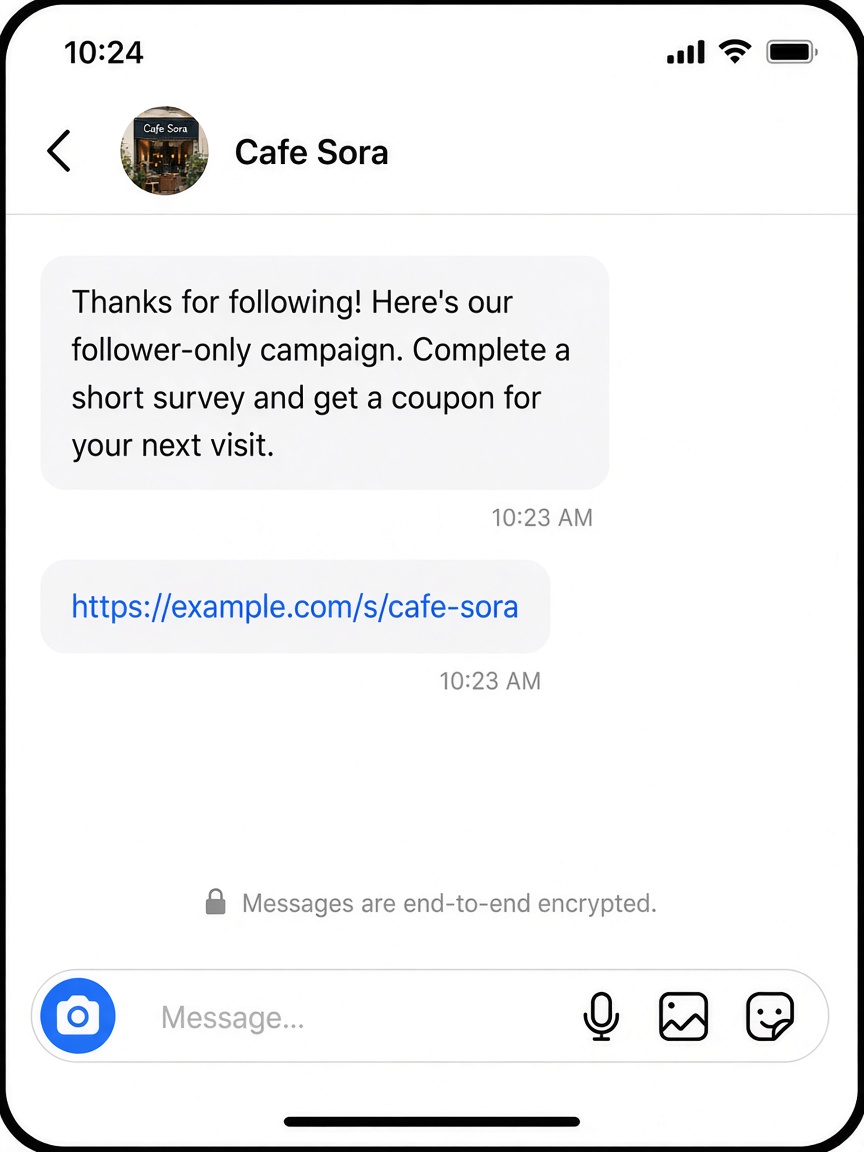
Many stores already run Instagram tactics such as “follow for a perk,” “follow & DM,” or “DM us to join the campaign.”
Just adding one Omakase MEO survey URL to that flow can extend the campaign toward collecting reviews.
A simple playbook:
Promote follow or DM participation in Stories or posts (your usual follower campaign)
In the DM reply, include the campaign details plus the survey URL
After customers answer, guide them to post a review and claim a reward
The same survey behind your in-store QR works in social conversations too. You don’t need a new system from scratch — add the URL to DMs you already send, and connect follower growth with MEO / review acquisition.
Use rewards to encourage answers and the next visit
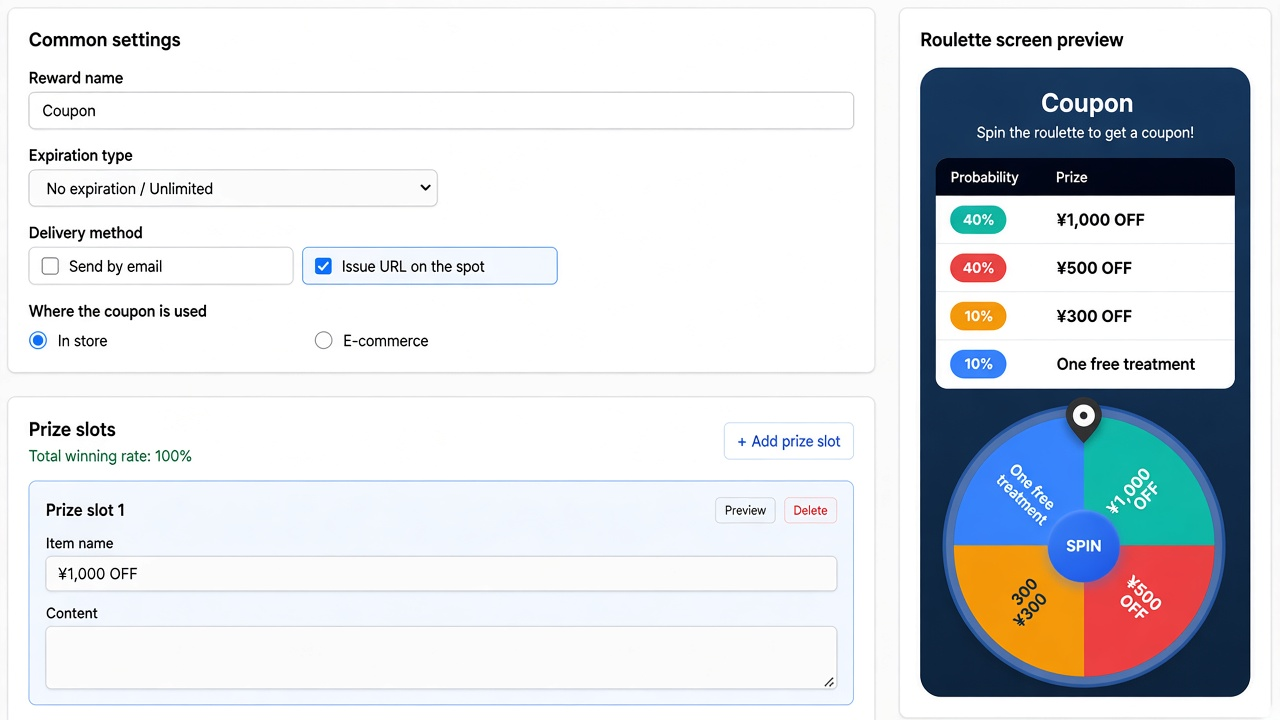
Participation rises when you offer a reward after the survey, not just ask questions.
In Omakase MEO you can choose how rewards are delivered (more than one method is allowed):
Send by email
Deliver over LINE
Issue a URL on the spot
Allow two or more and customers pick how to receive the reward. Different contact preferences are covered by the same reward setup.
You can also choose where the coupon is used: in store or e-commerce (coupon code) — for foot traffic or online repurchase.
A reward makes it easier to take the next step — “I’ll answer quickly” or “I’ll leave a review” — and turns the survey into a acquisition and return-visit campaign.
A recommended way to roll this out
This order usually works well:
Create a branching survey and check the flow in preview / test
Set up rewards, delivery methods, and how coupons are used
Put the URL on in-store QR / POP, and in DMs for your existing follower campaign on Instagram
Adjust questions and rewards based on answers and review activity
Even when the entry point differs between the storefront and Instagram, the survey and rewards can stay the same — so you widen touchpoints without adding much ops load.
In summary
Branching questions let you tailor surveys to visit type and purpose
Existing Instagram follower campaigns can promote the survey by adding the URL in a DM
Rewards (in-store / email / LINE; store coupons or e-commerce codes) push answers and next actions
A survey is more than a form for asking questions. Match it to the experience with branching, motivate with rewards, and connect it to Instagram DMs — and it becomes a path to reviews and return visits.
For setup details, see Surveys and Rewards in the store dashboard, or contact us via the contact form.